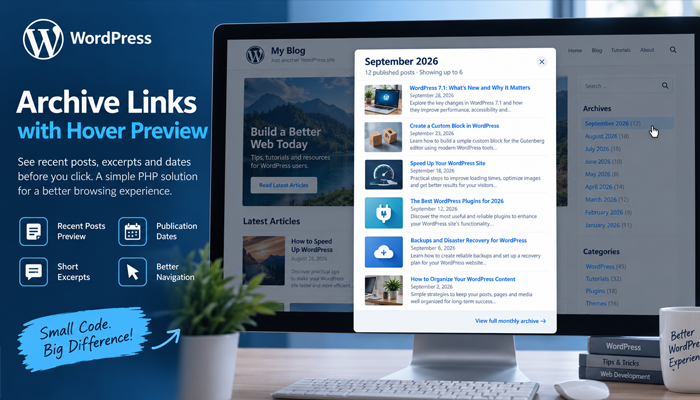
Improve the standard WordPress Archives widget with a desktop hover preview that displays recent posts, excerpts, dates, and a direct archive link. This tutorial explains how the PHP solution works, how to install it safely, customize its behavior, and use it with modern WordPress sites.
WordPress Compatibility: WordPress 7.1 and modern WordPress 6.x/7.x installations
PHP Requirement: PHP 7.4 or later recommended
Plugin Version: 1.0.0
Difficulty: Intermediate
Type: Standalone WordPress plugin or MU-plugin
WordPress archive links are useful, but they normally provide very little information before someone clicks them. A visitor may see links such as September 2026, August 2026, or July 2026 in the sidebar, yet they have no idea what articles are inside each month. The visitor must open the complete archive page just to discover whether that month contains something interesting.
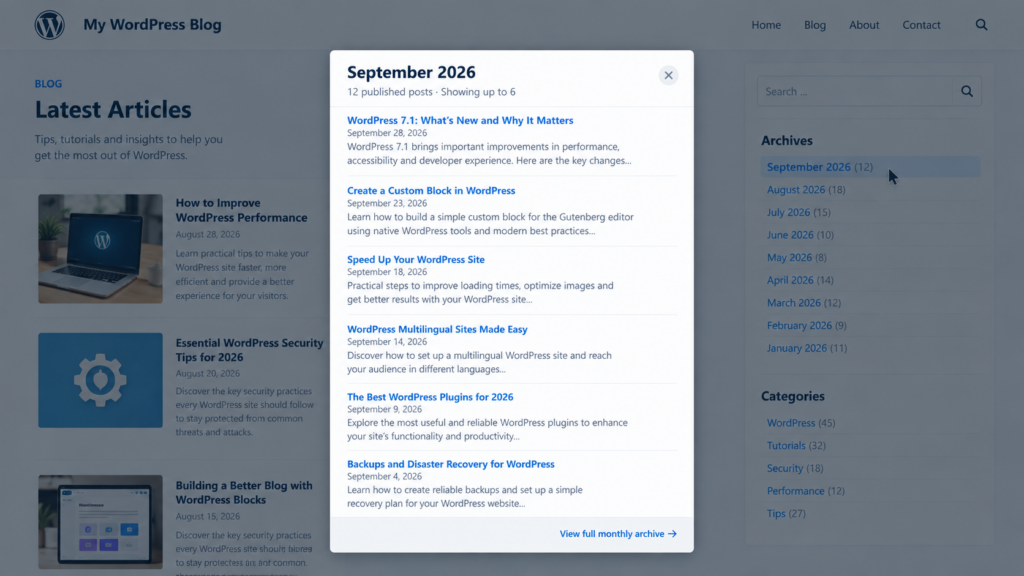
This tutorial improves that experience without replacing the native WordPress archive system. When a desktop visitor moves the mouse over a monthly archive link, a centered preview panel appears. It can display the month, the total number of published posts, up to six recent articles, publication dates, short excerpts, and a link to the complete archive. The original archive link remains available, so the enhancement works as an additional navigation layer rather than a replacement.
The solution is intentionally built around standard WordPress functions. It uses WP_Query, the REST API, transients, WordPress enqueue functions, native archive URLs, and a small JavaScript interface. No external JavaScript library, CSS framework, database table, or third-party API is required. The example presented here is based on the WPZone Archive Hover Preview plugin version 1.0.0.
What the WordPress Archive Hover Preview Does
The standard WordPress Archives widget is deliberately simple. It generates links to monthly archive pages and can optionally show the number of posts published during each month. That simplicity is useful, but on content-heavy websites it can leave visitors guessing. A label such as “August 2026” says when articles were published but tells visitors almost nothing about what those articles discuss.
Archive Hover Preview adds another layer to those links. On supported desktop devices, hovering over a monthly archive link opens a modal-style panel in the center of the viewport. The plugin detects the year and month represented by the link, sends a lightweight request to a custom WordPress REST API route, retrieves the relevant posts, and builds the preview dynamically in the browser.
The panel includes up to six published posts from that month. Each item can display its title, publication date, and a short excerpt. A footer link takes the visitor to the complete monthly archive if they want to continue browsing. The interface also includes loading feedback, an error state, a close button, Escape-key support, and a subtle backdrop behind the preview.
Why This Can Improve Archive Navigation
A traditional archive widget asks the visitor to make a navigation decision with almost no context. Previewing the contents first reduces that uncertainty. Someone interested in WordPress performance, for example, might hover over several months until they see a relevant tutorial. They can then open an individual article immediately or continue to the full monthly archive.
This approach is especially useful for blogs that publish frequently. If your site contains several years of monthly archives, archive labels alone can become difficult to distinguish. A preview allows old content to remain discoverable without filling the sidebar with article titles. The archive widget stays compact while the richer information only appears when a visitor requests it.
Importantly, the enhancement is progressive. The underlying WordPress links are not removed or rewritten. If JavaScript fails, if the visitor uses a touch device, or if the preview cannot retrieve data, the original archive links continue to function normally.
How the Archive Preview Works Behind the Scenes
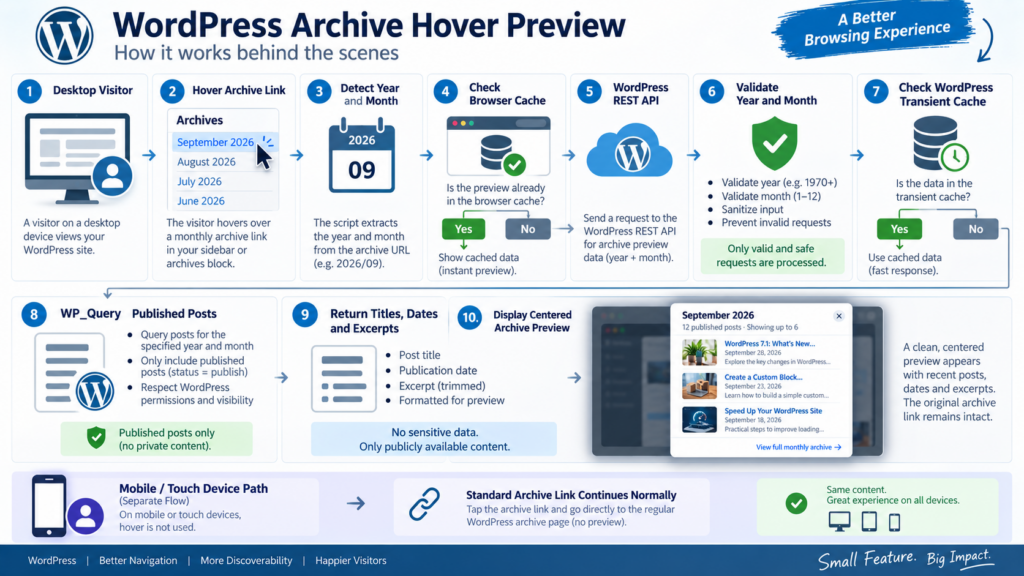
Although the visitor sees a simple popup, several parts of WordPress cooperate to make the feature work. First, JavaScript listens for mouse activity around archive widget links. It does not automatically intercept every link on the website. Instead, it looks for anchors located inside common WordPress archive widget and block containers.
After finding a compatible archive link, the script extracts its year and month. WordPress may generate different URL structures depending on permalink settings, so the script recognizes several patterns. Pretty archive URLs such as /2026/09/, traditional query URLs such as ?m=202609, and year/month query arguments can all be interpreted.
Once the date has been identified, the browser requests the corresponding archive information from a custom REST API endpoint. PHP performs the actual WordPress query. This separation is useful because the browser never needs direct database access. WordPress remains responsible for deciding which posts can appear and generating their URLs.
The REST API Request
The plugin registers a read-only REST API route under its own namespace. It accepts two values: the archive year and archive month. Both parameters are sanitized with absint() and validated against reasonable ranges before they are used.
The year must fall between 1970 and 2100, while the month must be between 1 and 12. Those checks are simple, but they are important. They prevent malformed values from being passed unnecessarily into the archive query and document the range of data the endpoint expects.
The endpoint is public because the information it returns is already public. It queries only posts with the publish status. Drafts, private posts, pending posts, and other non-public content are not intentionally included. The response contains titles, public permalinks, excerpts, dates, the monthly archive URL, and the total number of published posts.
The WordPress Query
The PHP component uses WP_Query rather than issuing a raw SQL query. That keeps the implementation aligned with WordPress APIs and makes the logic easier to understand and maintain.
The important query arguments include:
'post_type'           => 'post',
'post_status'         => 'publish',
'posts_per_page'      => 6,
'ignore_sticky_posts' => true,
'orderby'             => 'date',
'order'               => 'DESC',
'year'                => $year,
'monthnum'            => $month,
Only six posts are returned to the preview. However, WordPress still calculates the total number of matching posts. That allows the panel to say something such as “24 published posts · Showing up to 6” without sending all 24 posts to the browser.
Why the Plugin Uses Caching
An archive preview should feel instant, but it should also avoid repeating the same database query every time someone moves the mouse over a month. For that reason, the plugin uses the WordPress Transients API.
The first request for a particular month performs the normal WP_Query. The resulting archive information is stored as a transient for one hour. If another visitor requests the same month while that cache remains valid, WordPress can return the cached data instead of repeating the complete query.
The browser also maintains a small in-memory JavaScript cache for the current page view. Therefore, if a visitor opens September 2026, closes the preview, and hovers September again, the browser can usually render the previously received response immediately without another network request.
Cache Invalidation When Posts Change
A fixed one-hour cache would eventually update on its own, but publishing or changing a post could temporarily leave the preview outdated. The plugin addresses that situation through a cache-version option.
When a post is saved, deleted, moved to Trash, or restored, WordPress increments the archive preview cache version. Future transient keys include the new version, which effectively invalidates previously generated preview data.
This technique avoids trying to identify and delete every individual monthly transient. Old transient records can expire normally while new requests immediately use a fresh namespace. For a relatively small feature, it provides a practical balance between simplicity and correctness.
Desktop-Only Behavior Is Intentional
Hover interfaces are useful on computers with a mouse or precise pointing device, but they can be awkward on smartphones and tablets. Touchscreens do not have a true equivalent of persistent mouse hover. Trying to force the same interaction on every device can interfere with normal taps and archive navigation.
The CSS and JavaScript therefore use media feature detection. The preview is activated when the viewport is at least 1024 pixels wide and the browser reports both hover support and a fine pointer.
The relevant condition is:
@media (min-width: 1024px) and (hover: hover) and (pointer: fine)
JavaScript checks a matching media query as well. This means phones and most touch-oriented devices continue using the standard archive links. Nothing needs to be hidden from mobile visitors because there is no special interface to manage there.
Why This Is Better Than Checking the User Agent
Some developers try to detect mobile devices by examining the browser user-agent string. That method quickly becomes difficult to maintain because devices, browsers, tablets, convertible laptops, and operating systems constantly change.
Capability detection asks a more useful question: can this device actually hover with a precise pointer? A touchscreen laptop may have both touch input and a mouse. In that situation, the browser can report the capabilities required by the preview rather than forcing the site to classify the entire machine as either “desktop” or “mobile.”
For this feature, capability detection creates a more predictable experience and keeps the code independent from lists of device names.
Installing the Archive Hover Preview as a Plugin
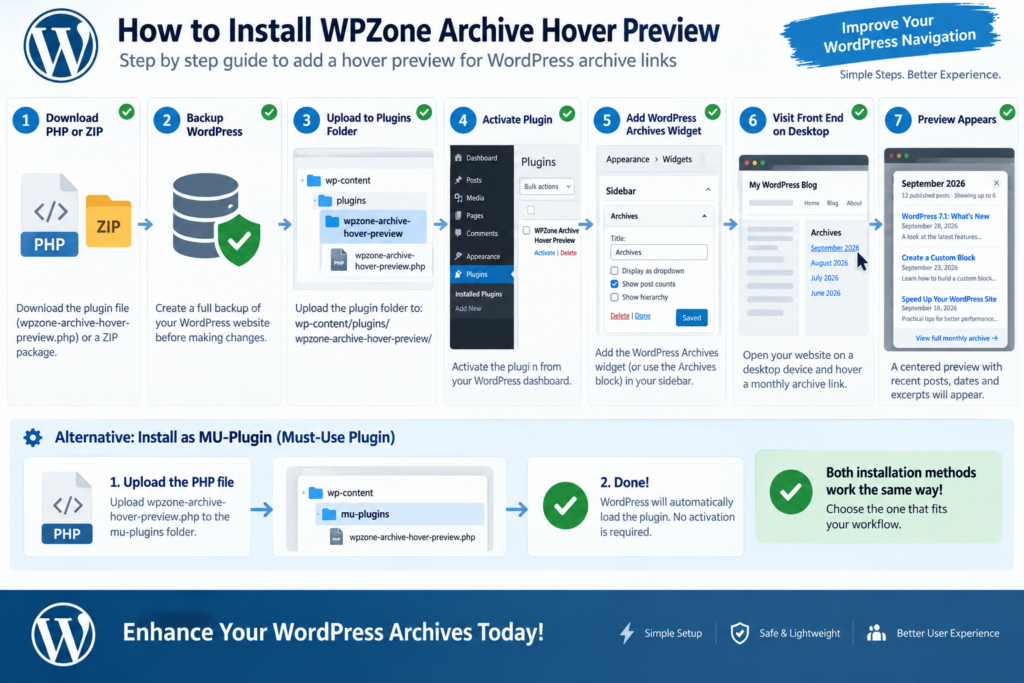
The simplest installation method is to treat the PHP file as a normal WordPress plugin. Download or create a file named wpzone-archive-hover-preview.php, place it inside its own directory, and upload that directory to /wp-content/plugins/.
A typical structure looks like this:
wp-content/
└── plugins/
    └── wpzone-archive-hover-preview/
        └── wpzone-archive-hover-preview.php
After uploading it, open WordPress Dashboard → Plugins → Installed Plugins and activate WPZone Archive Hover Preview. You do not need to create a database table or settings page. Once activated, the plugin automatically registers its REST endpoint, front-end assets, cache handling, and event listeners.
Before deploying any custom PHP on a production website, create a current backup or test the code on a staging installation. Custom plugins interact directly with WordPress, so even relatively small syntax mistakes can cause PHP errors if the file is modified incorrectly.
Installing It as an MU-Plugin
The same file can also run as a must-use plugin. MU-plugins are automatically loaded by WordPress and do not require activation from the Plugins screen.
Create this directory if it does not already exist:
/wp-content/mu-plugins/
Then place the PHP file directly inside it:
/wp-content/mu-plugins/wpzone-archive-hover-preview.php
WordPress automatically loads PHP files located directly in the mu-plugins directory. This installation method can be convenient for site-specific functionality that should not be accidentally deactivated from the dashboard.
If you put the plugin inside a subdirectory under mu-plugins, WordPress will not automatically discover the main file in the same way. In that case you would normally need a loader file. For this single-file example, placing the file directly inside mu-plugins is simpler.
Download the ZIP File
The tutorial uses the following filename:
wpzone-archive-hover-preview.zip
Complete WordPress PHP Code
The following is the complete example used by this tutorial. The original plugin is a single PHP file containing the WordPress REST endpoint, transient cache, CSS, and front-end JavaScript.
<?php
/**
* Plugin Name: WPZone Archive Hover Preview
* Description: Shows a centered desktop preview box with recent posts when hovering WordPress archive month links.
* Version: 1.0.0
* Author: WPZone
*/
if ( ! defined( 'ABSPATH' ) ) {
exit;
}
final class WPZone_Archive_Hover_Preview {
const VERSION = '1.0.0';
const REST_NS = 'wpzone/v1';
const REST_ROUTE = '/archive-preview';
public static function init() {
add_action( 'rest_api_init', array( __CLASS__, 'register_rest_route' ) );
add_action( 'wp_enqueue_scripts', array( __CLASS__, 'enqueue_assets' ) );
// Clear preview cache when public post content changes.
add_action( 'save_post_post', array( __CLASS__, 'bump_cache_version' ) );
add_action( 'deleted_post', array( __CLASS__, 'bump_cache_version' ) );
add_action( 'trashed_post', array( __CLASS__, 'bump_cache_version' ) );
add_action( 'untrashed_post', array( __CLASS__, 'bump_cache_version' ) );
}
public static function register_rest_route() {
register_rest_route(
self::REST_NS,
self::REST_ROUTE,
array(
'methods' => WP_REST_Server::READABLE,
'callback' => array( __CLASS__, 'rest_archive_preview' ),
'permission_callback' => '__return_true',
'args' => array(
'year' => array(
'required' => true,
'sanitize_callback' => 'absint',
'validate_callback' => function( $value ) {
$value = absint( $value );
return $value >= 1970 && $value <= 2100;
},
),
'month' => array(
'required' => true,
'sanitize_callback' => 'absint',
'validate_callback' => function( $value ) {
$value = absint( $value );
return $value >= 1 && $value <= 12;
},
),
),
)
);
}
public static function rest_archive_preview( WP_REST_Request $request ) {
$year = absint( $request->get_param( 'year' ) );
$month = absint( $request->get_param( 'month' ) );
$cache_version = (int) get_option( 'wpzone_archive_hover_cache_version', 1 );
$cache_key = 'wpz_arch_' . md5( $cache_version . '|' . $year . '|' . $month );
$cached = get_transient( $cache_key );
if ( false !== $cached ) {
return rest_ensure_response( $cached );
}
$query = new WP_Query(
array(
'post_type' => 'post',
'post_status' => 'publish',
'posts_per_page' => 6,
'ignore_sticky_posts' => true,
'orderby' => 'date',
'order' => 'DESC',
'year' => $year,
'monthnum' => $month,
'no_found_rows' => false,
)
);
$posts = array();
while ( $query->have_posts() ) {
$query->the_post();
$excerpt = get_the_excerpt();
$excerpt = wp_strip_all_tags(
    strip_shortcodes( $excerpt )
);

$excerpt = wp_trim_words(
    $excerpt,
    28,
    '…'
);
$posts[] = array(
'title' => html_entity_decode(
wp_strip_all_tags( get_the_title() ),
ENT_QUOTES,
get_bloginfo( 'charset' )
),
'url' => get_permalink(),
'excerpt' => $excerpt,
'date' => get_the_date( get_option( 'date_format' ) ),
'timestamp' => get_post_time( 'c', true ),
);
}
wp_reset_postdata();
$month_name = wp_date(
'F Y',
mktime( 12, 0, 0, $month, 1, $year )
);
$data = array(
'year' => $year,
'month' => $month,
'month_label' => $month_name,
'total' => (int) $query->found_posts,
'archive_url' => get_month_link( $year, $month ),
'posts' => $posts,
);
set_transient( $cache_key, $data, HOUR_IN_SECONDS );
return rest_ensure_response( $data );
}
public static function bump_cache_version() {
$current = (int) get_option(
'wpzone_archive_hover_cache_version',
1
);
update_option(
'wpzone_archive_hover_cache_version',
$current + 1,
false
);
}
public static function enqueue_assets() {
if ( is_admin() ) {
return;
}
wp_register_style(
'wpzone-archive-hover-preview',
false,
array(),
self::VERSION
);
wp_enqueue_style( 'wpzone-archive-hover-preview' );
$css = <<<'CSS'
@media (min-width: 1024px) and (hover: hover) and (pointer: fine) {
#wpzone-archive-preview-backdrop {
position: fixed;
inset: 0;
z-index: 999998;
background: rgba(15, 23, 42, .18);
opacity: 0;
visibility: hidden;
pointer-events: none;
transition: opacity .16s ease, visibility .16s ease;
backdrop-filter: blur(1.5px);
-webkit-backdrop-filter: blur(1.5px);
}
#wpzone-archive-preview-backdrop.is-open {
opacity: 1;
visibility: visible;
pointer-events: auto;
}
#wpzone-archive-preview {
position: fixed;
left: 50%;
top: 50%;
z-index: 999999;
width: min(680px, calc(100vw - 80px));
max-height: min(720px, calc(100vh - 80px));
overflow: hidden;
transform: translate(-50%, -48%) scale(.985);
background: #fff;
border: 1px solid rgba(15, 23, 42, .08);
border-radius: 18px;
box-shadow: 0 24px 70px rgba(15, 23, 42, .24);
opacity: 0;
visibility: hidden;
pointer-events: none;
transition: opacity .16s ease, transform .16s ease,
visibility .16s ease;
color: #1f2937;
}
#wpzone-archive-preview.is-open {
opacity: 1;
visibility: visible;
pointer-events: auto;
transform: translate(-50%, -50%) scale(1);
}
.wpz-archive-preview__header {
display: flex;
align-items: flex-start;
justify-content: space-between;
gap: 20px;
padding: 24px 26px 18px;
border-bottom: 1px solid #e5e7eb;
}
.wpz-archive-preview__title {
margin: 0;
font-size: 26px;
line-height: 1.2;
font-weight: 750;
letter-spacing: -.02em;
color: #111827;
}
.wpz-archive-preview__count {
margin: 6px 0 0;
font-size: 14px;
line-height: 1.5;
color: #6b7280;
}
.wpz-archive-preview__close {
flex: 0 0 auto;
width: 38px;
height: 38px;
border: 0;
border-radius: 50%;
background: #f3f4f6;
color: #374151;
cursor: pointer;
font-size: 24px;
line-height: 1;
display: inline-flex;
align-items: center;
justify-content: center;
transition: background .15s ease, transform .15s ease;
}
.wpz-archive-preview__close:hover,
.wpz-archive-preview__close:focus-visible {
background: #e5e7eb;
transform: scale(1.04);
outline: none;
}
.wpz-archive-preview__body {
max-height: calc(min(720px, 100vh - 80px) - 160px);
overflow: auto;
padding: 4px 26px;
overscroll-behavior: contain;
}
.wpz-archive-preview__post {
padding: 18px 0;
border-bottom: 1px solid #edf0f3;
}
.wpz-archive-preview__post:last-child {
border-bottom: 0;
}
.wpz-archive-preview__post-title {
display: inline;
font-size: 18px;
line-height: 1.35;
font-weight: 700;
color: #0969da;
text-decoration: none;
}
.wpz-archive-preview__post-title:hover {
text-decoration: underline;
}
.wpz-archive-preview__date {
margin: 5px 0 0;
font-size: 12px;
color: #8a94a3;
}
.wpz-archive-preview__excerpt {
margin: 8px 0 0;
font-size: 14px;
line-height: 1.65;
color: #4b5563;
}
.wpz-archive-preview__footer {
padding: 17px 26px 20px;
border-top: 1px solid #e5e7eb;
background: #fafafa;
text-align: right;
}
.wpz-archive-preview__archive-link {
font-size: 14px;
font-weight: 700;
text-decoration: none;
}
.wpz-archive-preview__archive-link:hover {
text-decoration: underline;
}
.wpz-archive-preview__loading,
.wpz-archive-preview__empty,
.wpz-archive-preview__error {
padding: 34px 0;
text-align: center;
font-size: 14px;
color: #6b7280;
}
.wpz-archive-preview__spinner {
display: inline-block;
width: 22px;
height: 22px;
margin-bottom: 10px;
border: 2px solid #d1d5db;
border-top-color: #4b5563;
border-radius: 50%;
animation: wpzArchiveSpin .65s linear infinite;
}
@keyframes wpzArchiveSpin {
to {
transform: rotate(360deg);
}
}
}
CSS;
wp_add_inline_style(
'wpzone-archive-hover-preview',
$css
);
wp_register_script(
'wpzone-archive-hover-preview',
'',
array(),
self::VERSION,
true
);
wp_enqueue_script( 'wpzone-archive-hover-preview' );
$config = array(
'restUrl' => esc_url_raw(
rest_url( self::REST_NS . self::REST_ROUTE )
),
'hoverDelay' => 220,
'closeDelay' => 180,
);
wp_add_inline_script(
'wpzone-archive-hover-preview',
'window.WPZoneArchiveHover=' .
wp_json_encode( $config ) .
';',
'before'
);
$js = <<<'JS'
(() => {
'use strict';
const cfg = window.WPZoneArchiveHover || {};
const desktopQuery = window.matchMedia(
'(min-width: 1024px) and (hover: hover) and (pointer: fine)'
);
const cache = new Map();
let openTimer = null;
let closeTimer = null;
let activeLink = null;
let activeKey = '';
let requestController = null;
function esc(value) {
return String(value ?? '')
.replace(/&/g, '&')
.replace(/</g, '<')
.replace(/>/g, '>')
.replace(/"/g, '"')
.replace(/'/g, ''');
}
function isArchiveWidgetLink(link) {
if (!(link instanceof HTMLAnchorElement)) {
return false;
}
return !!link.closest(
'.widget_archive, .wp-block-archives, ' +
'.wp-block-archives-list, ' +
'[class*="widget"][class*="archive"], ' +
'[class*="wp-block-archives"]'
);
}
function getArchiveDate(link) {
try {
const url = new URL(
link.href,
window.location.href
);
const pathMatch = url.pathname.match(
/\/(19|20)\d{2}\/(0?[1-9]|1[0-2])(?:\/|$)/
);
if (pathMatch) {
const year = parseInt(
pathMatch[0].match(/\d{4}/)[0],
10
);
const monthMatch = pathMatch[0].match(
/\/(0?[1-9]|1[0-2])(?:\/|$)/
);
const month = monthMatch
? parseInt(monthMatch[1], 10)
: 0;
if (year && month) {
return { year, month };
}
}
const m = url.searchParams.get('m');
if (m && /^\d{6}$/.test(m)) {
return {
year: parseInt(m.slice(0, 4), 10),
month: parseInt(m.slice(4, 6), 10)
};
}
const year = parseInt(
url.searchParams.get('year'),
10
);
const month = parseInt(
url.searchParams.get('monthnum'),
10
);
if (year && month >= 1 && month <= 12) {
return { year, month };
}
} catch (e) {}
return null;
}
function ensureUI() {
let backdrop = document.getElementById(
'wpzone-archive-preview-backdrop'
);
let modal = document.getElementById(
'wpzone-archive-preview'
);
if (!backdrop) {
backdrop = document.createElement('div');
backdrop.id =
'wpzone-archive-preview-backdrop';
backdrop.setAttribute(
'aria-hidden',
'true'
);
document.body.appendChild(backdrop);
}
if (!modal) {
modal = document.createElement('section');
modal.id = 'wpzone-archive-preview';
modal.setAttribute('role', 'dialog');
modal.setAttribute(
'aria-modal',
'false'
);
modal.setAttribute(
'aria-label',
'Archive preview'
);
document.body.appendChild(modal);
modal.addEventListener(
'mouseenter',
() => {
window.clearTimeout(
closeTimer
);
}
);
modal.addEventListener(
'mouseleave',
() => {
scheduleClose();
}
);
}
backdrop.addEventListener(
'click',
closePreview
);
return { backdrop, modal };
}
function renderLoading(label) {
const { modal } = ensureUI();
modal.innerHTML = `
<div class="wpz-archive-preview__header">
<div>
<h2 class="wpz-archive-preview__title">
${esc(label || 'Archive')}
</h2>
<p class="wpz-archive-preview__count">
Loading published posts…
</p>
</div>
<button
type="button"
class="wpz-archive-preview__close"
aria-label="Close preview"
>×</button>
</div>
<div class="wpz-archive-preview__body">
<div class="wpz-archive-preview__loading">
<span
class="wpz-archive-preview__spinner"
aria-hidden="true"
></span><br>
Loading preview…
</div>
</div>
`;
bindCloseButton(modal);
}
function renderData(data) {
const { modal } = ensureUI();
const totalText = Number(data.total) === 1
? '1 published post'
: `${Number(data.total || 0)} published posts`;
let postsHtml = '';
if (
Array.isArray(data.posts) &&
data.posts.length
) {
postsHtml = data.posts.map(post => `
<article class="wpz-archive-preview__post">
<a
class="wpz-archive-preview__post-title"
href="${esc(post.url)}"
>${esc(post.title)}</a>
${post.date
? `<p class="wpz-archive-preview__date">${esc(post.date)}</p>`
: ''
}
${post.excerpt
? `<p class="wpz-archive-preview__excerpt">${esc(post.excerpt)}</p>`
: ''
}
</article>
`).join('');
} else {
postsHtml =
'<div class="wpz-archive-preview__empty">' +
'No published posts found for this month.' +
'</div>';
}
modal.innerHTML = `
<div class="wpz-archive-preview__header">
<div>
<h2 class="wpz-archive-preview__title">
${esc(data.month_label || 'Archive')}
</h2>
<p class="wpz-archive-preview__count">
${esc(totalText)} · Showing up to 6
</p>
</div>
<button
type="button"
class="wpz-archive-preview__close"
aria-label="Close preview"
>×</button>
</div>
<div class="wpz-archive-preview__body">
${postsHtml}
</div>
<div class="wpz-archive-preview__footer">
<a
class="wpz-archive-preview__archive-link"
href="${esc(data.archive_url)}"
>
View full monthly archive →
</a>
</div>
`;
bindCloseButton(modal);
}
function renderError() {
const { modal } = ensureUI();
modal.innerHTML = `
<div class="wpz-archive-preview__header">
<div>
<h2 class="wpz-archive-preview__title">
Archive preview
</h2>
<p class="wpz-archive-preview__count">
Preview unavailable
</p>
</div>
<button
type="button"
class="wpz-archive-preview__close"
aria-label="Close preview"
>×</button>
</div>
<div class="wpz-archive-preview__body">
<div class="wpz-archive-preview__error">
The preview could not be loaded.
The archive link still works normally.
</div>
</div>
`;
bindCloseButton(modal);
}
function bindCloseButton(modal) {
const btn = modal.querySelector(
'.wpz-archive-preview__close'
);
if (btn) {
btn.addEventListener(
'click',
closePreview
);
}
}
function showUI() {
const { backdrop, modal } = ensureUI();
window.requestAnimationFrame(() => {
backdrop.classList.add('is-open');
modal.classList.add('is-open');
});
}
function closePreview() {
window.clearTimeout(openTimer);
window.clearTimeout(closeTimer);
if (requestController) {
requestController.abort();
requestController = null;
}
const backdrop = document.getElementById(
'wpzone-archive-preview-backdrop'
);
const modal = document.getElementById(
'wpzone-archive-preview'
);
backdrop?.classList.remove('is-open');
modal?.classList.remove('is-open');
activeLink = null;
activeKey = '';
}
function scheduleClose() {
window.clearTimeout(closeTimer);
closeTimer = window.setTimeout(() => {
const modal = document.getElementById(
'wpzone-archive-preview'
);
if (
activeLink?.matches(':hover') ||
modal?.matches(':hover')
) {
return;
}
closePreview();
}, Number(cfg.closeDelay || 180));
}
async function openPreview(link) {
if (
!desktopQuery.matches ||
!isArchiveWidgetLink(link)
) {
return;
}
const date = getArchiveDate(link);
if (!date) {
return;
}
const key =
`${date.year}-${String(date.month).padStart(2, '0')}`;
activeLink = link;
if (
activeKey === key &&
document.getElementById(
'wpzone-archive-preview'
)?.classList.contains('is-open')
) {
return;
}
activeKey = key;
window.clearTimeout(closeTimer);
renderLoading(
link.textContent
.trim()
.replace(/\s+\(\d+\)\s*$/, '')
);
showUI();
if (cache.has(key)) {
renderData(cache.get(key));
return;
}
if (requestController) {
requestController.abort();
}
requestController =
new AbortController();
const endpoint = new URL(
cfg.restUrl,
window.location.origin
);
endpoint.searchParams.set(
'year',
date.year
);
endpoint.searchParams.set(
'month',
date.month
);
try {
const response = await fetch(
endpoint.toString(),
{
method: 'GET',
credentials: 'same-origin',
headers: {
'Accept': 'application/json'
},
signal: requestController.signal
}
);
if (!response.ok) {
throw new Error(
`HTTP ${response.status}`
);
}
const data =
await response.json();
if (activeKey !== key) {
return;
}
cache.set(key, data);
renderData(data);
} catch (error) {
if (
error?.name === 'AbortError'
) {
return;
}
if (activeKey === key) {
renderError();
}
}
}
function onMouseOver(event) {
if (!desktopQuery.matches) {
return;
}
const link =
event.target.closest('a');
if (
!link ||
!isArchiveWidgetLink(link)
) {
return;
}
const related =
event.relatedTarget;
if (
related &&
link.contains(related)
) {
return;
}
window.clearTimeout(openTimer);
window.clearTimeout(closeTimer);
openTimer = window.setTimeout(
() => {
openPreview(link);
},
Number(cfg.hoverDelay || 220)
);
}
function onMouseOut(event) {
const link =
event.target.closest('a');
if (
!link ||
link !== activeLink
) {
return;
}
const related =
event.relatedTarget;
if (
related &&
link.contains(related)
) {
return;
}
window.clearTimeout(openTimer);
scheduleClose();
}
function onFocusIn(event) {
if (!desktopQuery.matches) {
return;
}
const link =
event.target.closest('a');
if (
link &&
isArchiveWidgetLink(link)
) {
openPreview(link);
}
}
document.addEventListener(
'mouseover',
onMouseOver,
true
);
document.addEventListener(
'mouseout',
onMouseOut,
true
);
document.addEventListener(
'focusin',
onFocusIn,
true
);
document.addEventListener(
'keydown',
event => {
if (event.key === 'Escape') {
closePreview();
}
}
);
desktopQuery.addEventListener?.(
'change',
event => {
if (!event.matches) {
closePreview();
}
}
);
})();
JS;
wp_add_inline_script(
'wpzone-archive-hover-preview',
$js,
'after'
);
}
}
WPZone_Archive_Hover_Preview::init();
PHP Creator WpZone.blog
Understanding the Security Model
A custom REST endpoint often attracts attention during a security review because developers need to decide whether requests should require authentication. In this case, the endpoint intentionally returns public archive information. It does not create posts, update options, change users, access drafts, upload files, execute commands, or modify WordPress content.
For that reason, the route uses:
'permission_callback' => '__return_true',
That does not automatically make the endpoint unsafe. Public WordPress pages already reveal the titles, dates, excerpts, and URLs of published posts. The endpoint simply provides a structured representation of a small subset of that same public information.
Nevertheless, keeping the query restricted to post_status => publish is important. If you modify the plugin later, avoid adding private metadata, drafts, email addresses, author account details, unpublished content, or other restricted information to the public response.
Input Validation Matters
The REST parameters are both sanitized and validated before the query runs. WordPress converts the values to absolute integers with absint(). The year and month are also checked against acceptable ranges.
That means values such as arbitrary strings, malformed months, and unexpected year numbers do not become unrestricted query input.
The plugin also escapes dynamically generated HTML in JavaScript through the esc() helper before inserting titles, excerpts, URLs, or dates into template strings. Even though WordPress strips HTML from several PHP values, escaping again at the final rendering boundary is a good defensive practice.
How Excerpts Are Prepared
Archive previews need to remain compact. Displaying complete WordPress articles inside the popup would be slow, visually overwhelming, and unnecessary. The plugin therefore prepares a short text excerpt for each article.
It starts with:
$excerpt = get_the_excerpt();
Shortcodes are removed, HTML tags are stripped, and WordPress trims the remaining text to approximately 28 words:
$excerpt = wp_strip_all_tags(
strip_shortcodes( $excerpt )
);
$excerpt = wp_trim_words(
$excerpt,
28,
'…'
);
This works whether the post has a manually written excerpt or WordPress generates one from the article content.
The resulting preview gives visitors enough context to understand the subject without duplicating large portions of the article. Short excerpts also help keep the modal height manageable when six posts are displayed.
How the Plugin Recognizes Archive Links
WordPress websites do not all use the same markup. A classic Archives widget may have a class such as .widget_archive, while the block-based Archives component uses classes beginning with .wp-block-archives.
The JavaScript therefore searches several known containers:
'.widget_archive, .wp-block-archives, .wp-block-archives-list, ' +
'[class*="widget"][class*="archive"], [class*="wp-block-archives"]'
This provides broader compatibility than relying on one exact CSS selector.
Once an anchor is found inside one of those containers, the script examines its destination URL. It does not depend solely on the visible text. That matters because archive text may be translated, customized by a theme, or include a post count.
Pretty Permalinks
A common monthly archive URL looks similar to:
https://example.com/2026/09/
The script detects the four-digit year and month directly from the path.
Plain Permalinks
Sites without pretty permalinks may produce something similar to:
https://example.com/?m=202609
The six-digit value contains the year followed by the month. The JavaScript separates those values before requesting the REST endpoint.
Alternative Query Arguments
The plugin can also recognize:
?year=2026&monthnum=9
Supporting these variants makes the feature more portable across different WordPress configurations.
Controlling How Quickly the Preview Opens
Opening a large popup the instant the mouse crosses an archive link can feel aggressive. The code therefore introduces a short delay before opening the preview.
The default configuration contains:
'hoverDelay' => 220,
'closeDelay' => 180,
The opening delay is 220 milliseconds. This is short enough to feel responsive but long enough to ignore many accidental mouse movements.
When the mouse leaves the link, the plugin waits 180 milliseconds before closing. That brief delay gives visitors time to move the pointer from the archive link into the centered panel.
Keeping the Panel Open
Without additional handling, the preview could disappear while someone moves the mouse toward it. The JavaScript avoids that problem by checking whether either the original archive link or the modal itself is currently hovered.
The popup remains visible while the visitor is interacting with its content. When the pointer leaves both areas, the normal close timer runs.
You can increase these delays if your audience prefers slower interactions. For example:
'hoverDelay' => 350,
'closeDelay' => 300,
Avoid extremely long delays because they make the interface appear unresponsive.
Customizing How Many Posts Appear
The default PHP query displays a maximum of six posts:
'posts_per_page' => 6,
For a smaller preview, change this value to four:
'posts_per_page' => 4,
You should also update the text generated in JavaScript from:
Showing up to 6
to:
Showing up to 4
Keeping both values synchronized prevents confusing interface text.
Displaying ten or twenty posts is technically possible, but that changes the purpose of the feature. The preview is meant to help the visitor decide whether an archive is worth exploring, not replace the complete archive page. Four to six entries usually provide enough context without producing an unnecessarily large response.
Customizing the Preview Width
The main preview uses:
width: min(680px, calc(100vw - 80px));
On a large desktop screen, the modal therefore reaches a maximum width of 680 pixels. On a narrower supported viewport, it automatically leaves approximately 40 pixels of space on each side.
For a wider panel, you could use:
width: min(760px, calc(100vw - 80px));
A wider design can be useful when excerpts are relatively long. Conversely, a compact 600-pixel panel may look better on minimalist blogs.
Avoid giving the preview a fixed width without a viewport fallback. Responsive calculations protect the interface when a visitor resizes the browser or uses a smaller laptop display.
Changing the Desktop Breakpoint
The current breakpoint is 1024 pixels. Both CSS and JavaScript use the same rule:
(min-width: 1024px)
If you want the feature only on larger desktop layouts, increase the breakpoint to 1200 pixels. Remember to change it in both places.
For example:
@media (min-width: 1200px) and (hover: hover) and (pointer: fine)
and:
window.matchMedia(
    '(min-width: 1200px) and (hover: hover) and (pointer: fine)'
);
Using matching conditions prevents situations where JavaScript thinks the preview is active while the corresponding CSS remains unavailable.
Testing the Plugin After Installation
After activating the plugin, first confirm that your website actually has a WordPress Archives widget or Archives block containing monthly links. The plugin does not automatically create the widget. It enhances existing archive links on the front end.
Visit the website from a desktop computer and move the mouse over one of those month links. After a short delay, you should see the background dim slightly and a white panel appear near the center of the screen. The panel should initially show a loading state before the posts become visible.
Check several different months. Their post titles, total counts, excerpts, and dates should correspond to the selected archive. Click an individual article and confirm that its normal permalink opens. Then test “View full monthly archive” and verify that WordPress loads the correct archive page.
Test the Normal Link Behavior Too
Do not test only the enhanced interaction. Click an archive link normally and verify that the underlying WordPress archive continues to work.
Temporarily disabling JavaScript in your browser is also a useful progressive-enhancement test. The popup will not appear, but the monthly archive links should remain ordinary links.
Finally, check the site on a smartphone or tablet. The intended behavior on touch-oriented devices is the standard WordPress archive navigation rather than the desktop hover interface.
Troubleshooting When the Preview Does Not Appear
If nothing happens when you hover an archive month, confirm that the browser window is at least 1024 pixels wide. The device must also report hover capability and a fine pointer. A touch-only device will deliberately skip the interface.
Next, inspect the HTML surrounding the archive links. Highly customized themes or page builders may generate archive navigation outside the standard WordPress widget classes. In that situation, isArchiveWidgetLink() may not recognize the container.
You can extend its selector list with the class used by your theme. For example, if your archive widget has a custom wrapper called .my-monthly-archives, add it to the selector:
return !!link.closest(
    '.widget_archive, .wp-block-archives, ' +
    '.my-monthly-archives'
);
Avoid selecting every link on the page because the script should only attempt to interpret real monthly archive URLs.
Preview Shows “Unavailable”
An unavailable message usually means the browser requested the endpoint but did not receive a successful response.
Possible causes include a security plugin blocking custom REST API requests, a CDN rule interfering with /wp-json/, a server configuration issue, or another plugin modifying REST behavior.
The important fallback remains intact: the archive link itself still works normally.
Check the browser Developer Tools Network panel and inspect the response from the archive preview request. Also verify that the native WordPress REST API is accessible according to your site’s intended configuration.
Performance Considerations
The plugin adds inline CSS and JavaScript to the front end, so there are no additional standalone CSS or JavaScript asset requests. The browser receives the interface logic as part of the generated page resources.
More importantly, archive post information is not loaded immediately for every month listed in the sidebar. If a widget contains 50 monthly archives, the plugin does not execute 50 queries when the page loads. A request occurs only after the visitor interacts with a specific month.
That on-demand approach reduces unnecessary work. Many visitors may never open a preview, while others may inspect only one or two months. The server performs work according to actual interaction rather than preloading every possible archive.
Why the Transient Cache Helps
The server-side transient further reduces repeat work. Once September 2026 has been requested, its response can remain cached for one hour.
A site using Redis or another persistent WordPress object cache may handle these transient operations particularly efficiently, depending on its configuration. Sites without persistent object caching still benefit because WordPress can manage transients through its normal storage system.
Because only six posts and relatively short excerpts are returned, the JSON response also remains modest compared with loading an entire WordPress archive page.
Accessibility Considerations
Hover-only functionality should never become the only way to access content. This implementation avoids that problem because the standard archive anchor remains underneath the enhancement.
The JavaScript also listens for focusin events. On supported desktop environments, focusing an archive link can trigger the preview without requiring a mouse hover. In addition, pressing Escape closes an open panel, and the close control includes an accessible label.
However, developers who adapt this code into a fully modal interface should consider more advanced focus management. A strict modal dialog usually requires focus trapping, restoring focus to the triggering element after closure, and carefully handling keyboard navigation.
This implementation sets aria-modal="false" because the preview behaves more like an enhanced informational overlay than a mandatory modal workflow. Users remain able to follow the underlying navigation rather than being forced through the panel.
Compatibility With WordPress 7.1
WordPress 7.1 became the current release on August 19, 2026. The official WordPress release archive identifies 7.1 as the latest actively maintained release at the time this tutorial was prepared.
The implementation relies primarily on established APIs such as register_rest_route(), WP_Query, get_transient(), set_transient(), wp_add_inline_style(), wp_add_inline_script(), rest_url(), and get_month_link(). These are normal WordPress development APIs rather than private implementation details.
Even so, custom code should always be tested with the theme and plugins running on the destination site. Compatibility involves more than WordPress Core alone. Security plugins can change REST behavior, caching plugins can affect requests, and custom themes can change archive widget markup.
For production deployment, testing on a staging clone remains the safest workflow.
Using It With Classic Widgets and Block Widgets
Older WordPress themes often display archives through the classic Archives widget. Modern themes may use the Archives block instead. The JavaScript deliberately includes selectors for both approaches.
Classic widget markup commonly includes:
.widget_archive
Block-based markup commonly uses:
.wp-block-archives
As a result, the same plugin can work across a wide variety of traditional and block-oriented themes without maintaining separate PHP implementations.
The plugin does not depend on Gutenberg editor JavaScript. Its logic runs only on the public-facing website. Therefore, using the Classic Editor plugin or another editor does not inherently prevent the archive preview from functioning.
Why No Database Table Is Required
Some plugins create custom tables for caching or storing configuration. That would be unnecessary for this feature.
The archive information already exists in WordPress posts, and there are no persistent user settings to maintain. Temporary results fit naturally into WordPress transients, while a single option value tracks the cache version.
Avoiding custom tables makes installation and removal simpler. There is no schema migration, activation SQL, or database cleanup routine to manage.
If the plugin is removed, WordPress can eventually expire its temporary transients. The small cache-version option may remain unless explicitly deleted, but it contains only an integer and does not affect the rest of the site.
Why the REST Response Contains Only Public Data
A useful principle for public WordPress endpoints is to return only information that an anonymous visitor could reasonably obtain from the website already.
This example follows that approach. It exposes published post titles, public permalinks, short text excerpts, publication dates, archive counts, and monthly archive URLs.
The query explicitly uses:
'post_status' => 'publish',
That restriction should remain in place unless the endpoint is redesigned with authentication and authorization.
Do not extend the public response with draft content, private custom fields, customer information, WooCommerce order details, email addresses, unpublished metadata, administrative notes, or other protected information.
Can the Preview Be Used for Categories or Tags?
The same overall architecture can be adapted to categories, tags, authors, or custom taxonomies, but this particular implementation is designed specifically for monthly archives.
The browser extracts a year and month from each archive URL. The REST endpoint then queries posts with the corresponding year and monthnum parameters.
A category version would instead detect a category identifier or slug and validate that value before running a taxonomy query. Tags would require similar logic.
Keeping the monthly implementation focused has an advantage: the endpoint accepts only two predictable numeric parameters. If you extend the concept, create clear validation and sanitization rules for each new input rather than simply accepting arbitrary query variables.
Customizing the Visual Design
All styling lives in the $css heredoc, which makes visual customization straightforward.
The main panel currently uses a white background, rounded corners, a thin border, and a large shadow:
background: #fff;
border: 1px solid rgba(15, 23, 42, .08);
border-radius: 18px;
box-shadow: 0 24px 70px rgba(15, 23, 42, .24);
For a flatter WordPress admin-inspired design, reduce the border radius and shadow:
border-radius: 8px;
box-shadow: 0 12px 30px rgba(15, 23, 42, .18);
The post title color is currently:
color: #0969da;
You can replace that value with your site’s primary link color.
When adjusting styles, avoid changing class names unless you update every place where those classes are referenced.
Changing the Excerpt Length
The default excerpt length is approximately 28 words:
$excerpt = wp_trim_words(
    $excerpt,
    28,
    '…'
);
A more compact panel could use 18 words:
$excerpt = wp_trim_words(
    $excerpt,
    18,
    '…'
);
A wider panel might comfortably display 35 words.
Longer excerpts increase the height of every result. Since six articles may appear at once, a small change can significantly increase scrolling inside the preview. For most blog layouts, 20 to 30 words creates a useful balance between context and visual density.
Frequently Asked Questions
Does this replace the WordPress Archives widget?
No. The plugin enhances existing monthly archive links. You still need a WordPress Archives widget, Archives block, or compatible monthly archive list on the page.
Does the hover preview work on smartphones?
The example intentionally targets devices with a viewport of at least 1024 pixels, hover capability, and a fine pointer. Mobile visitors continue using the standard archive links.
Does it expose draft posts through the REST API?
The query explicitly requests posts with the publish status. Drafts and other unpublished post statuses are not part of the intended response.
How many posts appear inside the popup?
The default limit is six. Change posts_per_page if you prefer a smaller or larger number, and update the interface text accordingly.
Does every hover create a database query?
No. The plugin uses both browser-side caching and WordPress transients. Server responses are cached for one hour, while repeated interactions on the same page can use the browser’s in-memory cache.
Can I install it as an MU-plugin?
Yes. Place the PHP file directly inside /wp-content/mu-plugins/. WordPress automatically loads it without requiring normal plugin activation.
Can I install it as a regular plugin?
Yes. Place it inside a folder under /wp-content/plugins/, then activate it from the WordPress Plugins screen.
Will the archive links still work if JavaScript fails?
Yes. The standard WordPress archive anchors remain intact. The hover interface is an enhancement rather than the only navigation method.
Can I change the popup colors and dimensions?
Yes. The visual design is contained in the inline CSS inside the PHP file. You can adjust width, spacing, colors, shadows, typography, and other presentation properties.
Is it safe to use a public REST route?
A public route can be appropriate when it returns only public information. This example intentionally queries published posts and exposes information already available on public archive and post pages. Any extension that exposes private data would require a different security model.
A Practical Upgrade for Content-Heavy WordPress Sites
Monthly archives remain one of the simplest ways to organize an established blog chronologically, but their minimal presentation can make older content difficult to explore. Adding a contextual preview turns a basic month link into a much more informative navigation tool while preserving the original WordPress structure.
The solution shown here avoids unnecessary dependencies. WordPress handles the archive query and public URLs, the REST API provides data only when requested, transients reduce repeat database work, and lightweight JavaScript creates the interface. Touch devices retain ordinary archive navigation, while desktop users gain the additional preview experience.
Most importantly, the enhancement remains optional from the visitor’s perspective. Nothing prevents someone from clicking the normal archive link. That combination of progressive enhancement, caching, limited public data, and standard WordPress APIs makes this pattern useful as a general starting point for custom archive navigation projects.
⚠️ Disclaimer and Source Hygiene
This tutorial is provided for educational and general WordPress development purposes. Custom PHP can interact directly with WordPress Core, your active theme, plugins, cache system, REST API configuration, and hosting environment. Always maintain a recent backup and preferably test custom code on a staging website before deploying it to production.
The implementation discussed in this article is based on the supplied WPZone Archive Hover Preview version 1.0.0 source file and standard WordPress development APIs. WordPress version information was checked against the official WordPress release archive, which lists WordPress 7.1 as the current release from August 19, 2026.
Security requirements can change when code is modified. If you adapt the REST endpoint to expose private data, accept additional parameters, modify posts, interact with users, or perform privileged operations, additional authentication, authorization, validation, nonce handling, or capability checks may become necessary. Consult the official WordPress developer documentation and a qualified developer or security professional when working with sensitive production systems.
🔔 For more tutorials like this, consider subscribing to our blog.
📩 Do you have questions or suggestions? Leave a comment or contact us!
🏷️ Tags: WordPress archive preview, WordPress PHP, WordPress archive widget, WordPress REST API, WordPress custom plugin, WordPress MU plugin, WordPress hover popup, WordPress archives, WordPress development, WordPress customization
📢 Hashtags: #WordPress, #WordPressTutorial, #WordPressDevelopment, #PHP, #WordPressPlugin, #WebDevelopment, #WordPressTips, #WordPressArchives, #WPTutorial, #Coding
Sources and References
WordPress Release Archive: Official WordPress release information identifies WordPress 7.1, released August 19, 2026, as the latest release in the actively maintained series at the time this tutorial was prepared.
WordPress 7.0 Documentation: WordPress 7.0 “Armstrong” was released on May 20, 2026, before the subsequent 7.0 maintenance releases and WordPress 7.1.
Plugin Source: WPZone Archive Hover Preview version 1.0.0, including its REST API handler, WP_Query, transient cache, CSS, and JavaScript archive detection logic.
Secondary Sources and Testimonials
This tutorial does not rely on unverifiable testimonials or fabricated performance claims. The described functionality is derived directly from the supplied source code and established WordPress behavior. Results can vary depending on the active theme, archive markup, hosting configuration, REST API restrictions, caching layer, and other plugins installed on the website.
For compatibility testing, use a staging copy that closely matches the production environment. Verify desktop hover behavior, archive URLs, the custom REST response, post counts, excerpt output, mobile fallback behavior, caching, keyboard interaction, and normal archive navigation before deploying the feature broadly.